

image

Frequently Asked Questions

Here you will find answers to our most commonly asked questions. 

Sometimes when you make a change on your dashboard, you won’t see it right away. Try refreshing your page and the change should appear.

The team is continuously monitoring the site for new business listings coming through. Once we’ve had a chance to confirm that your business is live, and belongs to you, you’ll receive an approval email from us. This usually takes no more than a few hours.

However, if you don’t see the approval email within 24 hours, please check your spam folder. Still don’t see the approval email? Contact us directly at info@quilting.com

Want to upgrade your membership? You can do this in 1 of 2 ways.

Head to https://quilting.com/pricing-plan/ and choose your plan.

On your Dashboard > Businesses, click on the 3 dots, then “Change Plan.”
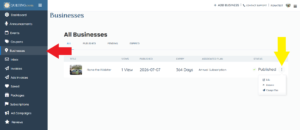
Screenshot of editing Business

To edit your business listing, go to your Dashboard > Businesses, click on the 3 dots, then “Edit”.

Screenshot of editing Business

Have you received a review that you believe is incorrect? Let us know by sending an email to info@quilting.com.

We have ad opportunities on 3 different places on the site – Home page, Blogs, and Search results pages. Your ad will be your “business card” which includes your business cover image and information.

To create your ad(s), go to your Dashboard > Ad Campaigns. Then click on “Add New Ad.”

There you can choose where you want your ad to be placed and for how long. If you have any questions about ads, please reach out to us at sales@quilting.com.

Screenshot of adding Ad Campaigns

If you need to update your payment information, please send an email to sales@quilting.com.

Of course, we’d love for you to stay! However, if you need to cancel your membership, go to your Dashboard > Subscriptions. Click on the button “Unsubscribe”. Your subscription will remain active until the membership duration ends. It will not renew.

Feel free to reach out to us to info@quilting.com.